
Skip to content
  • 7400 Union Park Ave Suite 101

  • About
  • Live Chat
Quomation Insurance Services
  • Home
  • Products
    • AgencyStream Manage
    • AgencyStream Quote
    • AgencyStream Portal
    • IT Consulting Projects
  • Announcements
  • Live Chat
  • Contact
801.226.1395

Contact us

Quomation Insurance Services
  • ">
  • 801.226.1395

How to Run IVANS

Knowledge Base

  • AgencyStream Quote
    • How to Bridge a Quote to AgencyStream Manage
    • How to Create an Auto Quote
    • How to Create an ID Card
  • AgencyStream Manage
    • Commercial Equipment Tab
    • How to Create a Certificate of Liability
    • How to Create a New Client
    • How to Create a Payment Due Date Report
    • How to Create a To-Do Item
    • How to Create a Recurring To-Do Item
    • How to Create a Reminder on the Dashboard
    • How to Run IVANS
    • How to Run Non-IVANS
    • How to Set Up the Client Search
  • AgencyStream Portal
    • Agency Portal Setup

Announcements

  • Quomation Releases New Website
  • January 2024 Newsletter
  • March 2023 Newsletter

News

  • Texas MyClick Mailer
View Categories
  • Home
  • Documentation
  • Knowledge Base
  • AgencyStream Manage
  • How to Run IVANS

How to Run IVANS

Step 1: Click on the ‘IVANS‘ tab

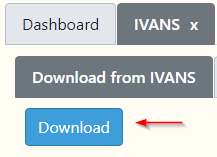
Step 2: From the ‘Download from IVANS‘ tab click on ‘Download‘
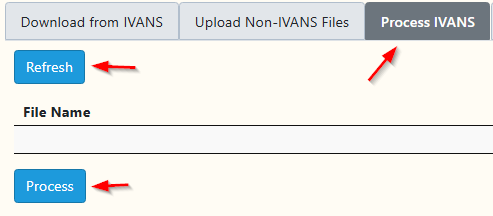
Step 3: Click on the ‘Process IVANS‘ tab and click on the ‘Refresh‘ button, then click on the ‘Process’ button. The status will change to OK once the file(s) have been processed
Step 4: Click on the ‘IVANS Log‘ to see what has downloaded


Updated on August 26, 2025
How to Create a Reminder on the DashboardHow to Run Non-IVANS
Quomation Insurance Services

Contact

  • (801) 226-1395

  • PO BOX 982941 Park City UT 84098-2941

Open Hours

Mon – Fri: 7:00 am to 5:00 pm Mountain Time Closed Sat/Sun

Newsletter

Subscribe to our newsletter to get our latest update & news.

801.226.1395

Contact Us

www.quomation.com Copyright © 2023-2026  |  Privacy Policy